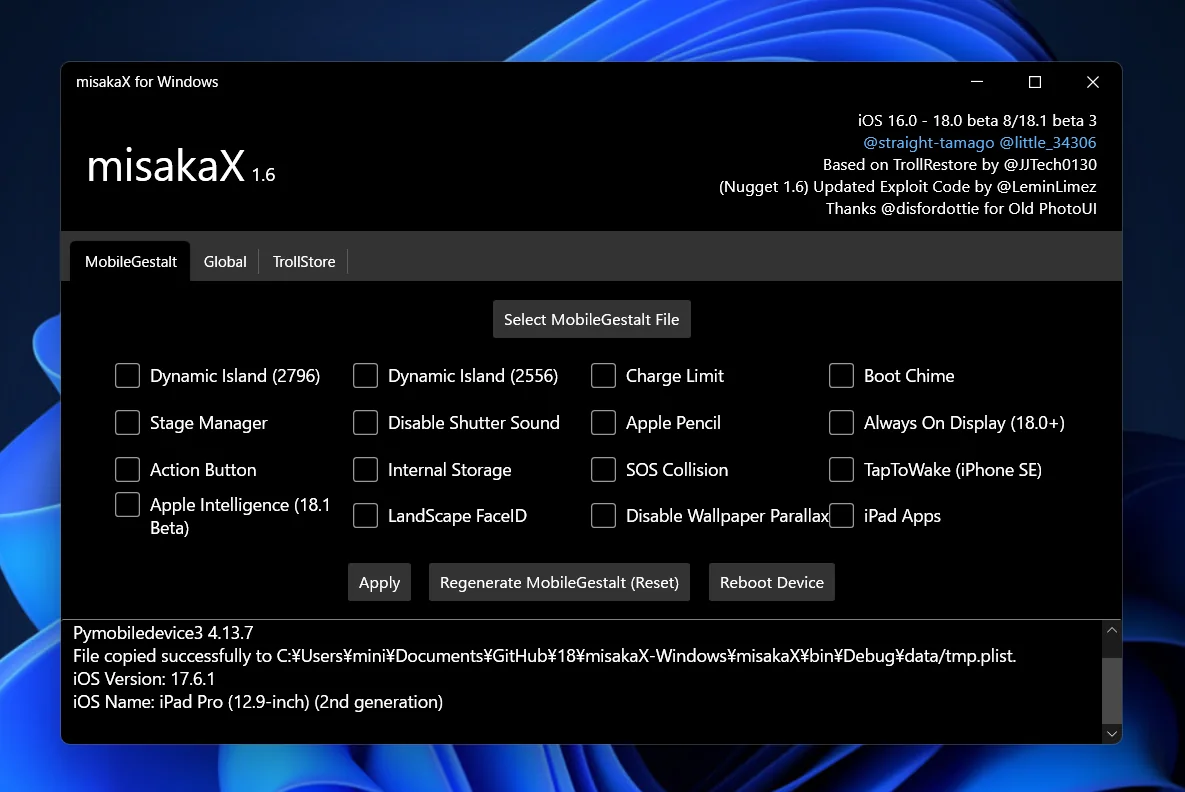
Does MisakaX work on Windows?
Yes, but Windows support belongs to a specific release—not to the name alone. MisakaX 2.2 has an official Windows ZIP, and misaka26 1.6 has a separate official Windows ZIP marked Unstable by its owner. MisakaX 2.3 has no official Windows asset.
Which MisakaX version should I download for Windows?
Start with your exact iOS or iPadOS ProductVersion and BuildVersion, then use the compatibility checker. If the matched track is legacy MisakaX 2.2, use misakaX-2.2-windows-edition.zip. If it is misaka26 1.6, use misaka26-v1.6-Windows-Edition.zip. Do not choose only by which release looks newer.
Is there a MisakaX 2.3 download for Windows?
No official MisakaX 2.3 Windows asset is published in the owner release record. The 2.3 release contains a macOS archive only. A renamed mirror or source-code ZIP does not create Windows support.
Is misaka26 1.6 stable on Windows?
No. GitHub may display a Latest badge, but the owner names the release Unstable and warns about bootloop risk. “Latest” describes release ordering; it does not override the creator’s stability label.
Does MisakaX support 32-bit Windows?
The owner does not publish a 32-bit Windows support matrix. The inspected official archives contain amd64 or 64-bit runtime components, so this guide does not promise 32-bit support.
What minimum Windows version does MisakaX require?
The current owner pages do not state a universal minimum Windows build. We use current Windows 10/11 extraction and PowerShell instructions here, but that is not a product compatibility guarantee. Record your Windows edition and build if the app does not start.
Do I need iTunes for MisakaX on Windows?
For legacy MisakaX 2.2, yes: the owner explicitly requires iTunes and says to avoid the Microsoft Store version, linking a standalone Apple installer. For misaka26 1.6, the owner publishes a Windows asset but no equally explicit Windows dependency page; the strongest collected Windows workflow also uses standalone iTunes.
Can Apple Devices replace iTunes for MisakaX?
Do not assume so for legacy MisakaX 2.2. Apple Devices is Apple’s current general Windows device-management app, but the MisakaX 2.2 owner specifically requires standalone iTunes. Seeing the phone in Apple Devices proves the Apple connection layer works; it does not prove that this MisakaX release can use that stack.
Can I use iTunes from the Microsoft Store?
Not for the documented MisakaX 2.2 route. Its release notes explicitly say to avoid the Microsoft Store version. Do not install multiple Apple stacks blindly; first record what is installed, then follow the dependency named by the exact product release.
Should I install Apple Devices and standalone iTunes together?
This page does not recommend stacking them. Apple documents Apple Devices for current general management, while MisakaX 2.2 names standalone iTunes. If both are already installed and detection is inconsistent, document that environment rather than repeatedly adding or removing drivers.
Do I need to install Python for MisakaX on Windows?
The inspected official Windows archives include their own runtime files: MisakaX 2.2 includes an embedded 64-bit Python runtime, and misaka26 1.6 includes compiled helper/runtime files. Do not install a random Python package as a first fix. Keep the extracted folder intact.
How do I extract the MisakaX Windows ZIP?
Right-click the downloaded ZIP, choose Extract All, and open the resulting folder. Do not run the app from the compressed-folder preview, and do not move only the EXE away from its data and runtime files.
Which EXE should I open?
Open misakaX.exe at the top level of the extracted MisakaX 2.2 folder, or misaka26.exe at the top level of the extracted misaka26 1.6 folder. Never run an EXE from a mirror whose release ownership you cannot verify.
Why does misaka26 open and close immediately or report a missing DLL?
Return to the verified owner ZIP and use Extract All again; the Windows app depends on adjacent Flutter, data, helper and runtime files. Do not download a DLL from a third-party site or move only misaka26.exe. If a complete, verified folder still fails, save the exact Windows event or dialog and report the release, Windows build and extraction path.
Should I run MisakaX as administrator?
Not by default. The owner release notes do not make administrator mode a universal requirement. If normal launch fails, capture the exact Windows message and verify the source, extraction and security state before expanding privileges.
How do I verify the misaka26 Windows ZIP hash?
Run Get-FileHash against the exact downloaded ZIP in PowerShell. For misaka26 1.6, the SHA-256 must be 98d6565d3c16dae2e955df27dbdfc6c04826c3f6de1d8e52a7db50c31d52c9c9, which is published in the owner asset record.
What is the official SHA-256 for MisakaX 2.2 Windows?
The owner asset record does not publish a digest for MisakaX 2.2 Windows. Do not treat a hash copied from a mirror or this guide as owner verification. Verify the repository owner, release tag and exact filename, and keep the downloaded archive unchanged.
What should I do if SmartScreen or Windows Security warns about MisakaX?
Stop before running it. A warning is neither proof of malware nor proof of a false positive. Verify the owner release, exact asset name and published digest where one exists, then make your own security decision. Do not disable Defender, Smart App Control or reputation-based protection for this guide.
Why does my iPhone charge but MisakaX does not detect it?
Charging proves power, not a data connection. Unlock the device, use a data-capable cable, try another direct USB port, accept Trust, and check whether Apple Devices or the matched iTunes installation sees the phone. Fix the Apple connection layer before changing MisakaX files.
Why does iTunes detect my iPhone but MisakaX does not?
That separates the problem: cable, USB and trust are working, but the product layer is not. Confirm the exact release, complete extraction and required Apple software; close competing device-management windows, reconnect once and save the MisakaX log. Do not churn through drivers or Apply repeatedly.
How do I make the Trust This Computer prompt appear again?
Unlock the device, leave it on the Home Screen and reconnect it. If the prompt still does not appear, Apple documents Reset Location & Privacy as the way to make trusted-computer decisions appear again. That resets privacy/location choices, so use Apple’s current instructions—not a third-party profile or registry edit.
What does “Apple Mobile Device Service is not started” mean?
That exact iTunes error has an Apple-documented Windows route: disconnect the device, close iTunes, open Services, set Apple Mobile Device Service to Automatic, stop and start it, restart the computer, then open iTunes. Do not apply these steps to an unrelated MisakaX error.
Should I connect more than one iPhone or iPad?
No. Keep only the intended target connected during file selection and Apply. This protects the device-to-plist identity chain and makes logs attributable to one device.
Why does Select MobileGestalt open a file picker or do nothing?
That is a file or workflow problem, not proof of a USB-driver failure. Confirm that you extracted and preserved the untouched MobileGestalt file from this exact device, then follow the dedicated MobileGestalt guide. Never substitute another device’s plist.
What if MisakaX says success but the feature does not appear?
A success message proves only that one application stage completed. Check the required reboot or respring, exact build compatibility, selected flag and actual setting/function. An owner issue records success with no visible effect, so stop after one attributable attempt and preserve the log.
Should Find My be turned off?
Some collected Windows workflows instruct users to turn it off before the write, but the requirement is release- and workflow-specific. Follow the exact release-linked guide, understand the activation/account implications, and turn it back on only after the device is stable and the result is verified.
Does MisakaX create a backup automatically?
Do not rely on it as your data backup. Make and verify a current Apple backup before the first write, and separately preserve the untouched device-specific MobileGestalt. Those are different recovery assets.
Can an encrypted iPhone backup or MDM affect misaka26?
Possibly, but there is no universal rule. One owner issue reports a restore error in an encrypted-backup/MDM environment. Treat that as an incident clue, not proof that encryption or MDM is always the cause; record both states when requesting support.
Can I use Wine or a virtual machine instead of native Windows?
There is no owner-published support contract for Wine, virtual machines or USB passthrough. Those layers change device visibility and driver behavior. Use the native platform asset matched to the release, or treat virtualization as an unsupported variable.
What should I include in a Windows detection report?
Include product and release, exact ZIP filename/source, Windows edition/build, Apple stack, whether Apple software sees the device, trust state, USB/cable tests, extraction state and the exact MisakaX log/error. Do not post your plist, serial, UDID, IMEI, Apple Account details or backup password.
Does the Windows route checker access my device?
No. It runs locally in the browser and only classifies the answers you select. It has no USB, file, Apple Account or device access and uploads nothing.