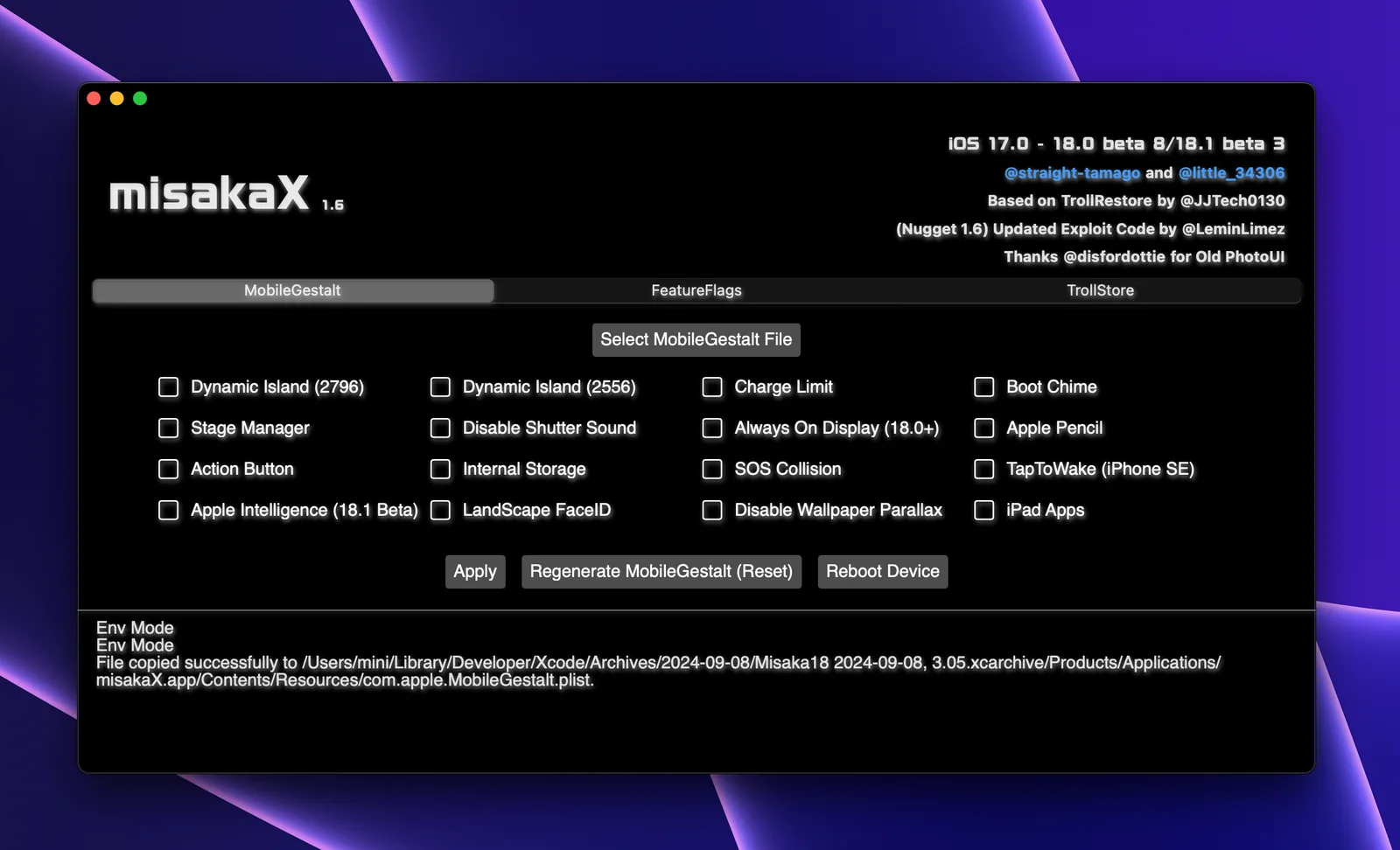
Does MisakaX work on macOS?
Yes, when the exact iOS or iPadOS build matches a Mac release. MisakaX 2.2, the macOS-only 2.3 Pre-release and misaka26 1.6 Unstable all have owner-published Mac archives. A Mac download proves platform availability, not device-build compatibility or feature outcome.
Which MisakaX version should I use on a Mac?
Use the compatibility checker before choosing a file. MisakaX 2.2 and 2.3 belong to different beta-era ranges, while misaka26 1.6 is a separate Unstable track. Do not select 2.3 merely because its number is higher.
Is MisakaX 2.3 only for macOS?
Yes. The owner release has one application asset, misakaX_macOS_v2.3.zip. It is a Pre-release for a narrow stated beta window; it is not a universal upgrade from 2.2 and has no official Windows application.
Is MisakaX 2.3 a stable Mac release?
No. GitHub marks 2.3 as a Pre-release. MisakaX 2.2 remains the normal Latest route in the legacy repository, while misaka26 1.6 is separately named Unstable by its owner.
Does MisakaX support Apple silicon and Intel Macs?
The main executables inside the inspected official Mac archives for MisakaX 2.2, 2.3 and misaka26 1.6 are universal Mach-O binaries containing arm64 and x86_64 slices. Their helper folders also include both architectures. This proves packaged architecture support, not a tested matrix for every Mac and macOS release.
How do I tell whether my Mac uses Apple silicon or Intel?
Open Apple menu → About This Mac. Apple says Apple-silicon Macs show a Chip field, while Intel Macs show a Processor field. Record that value and the macOS version before troubleshooting.
What minimum macOS version does MisakaX require?
The inspected bundles declare macOS 11.0 for MisakaX 2.2 and 2.3, and macOS 10.15 for misaka26 1.6. Those Info.plist values are launch metadata, not owner-published test coverage. Public issues show that a Mac can satisfy the declared minimum and still encounter a release-specific crash or file error.
Does MisakaX need Rosetta on an Apple-silicon Mac?
The inspected main binaries are universal, so the application is not an Intel-only bundle. If macOS asks for Rosetta, record which component triggered the request rather than assuming every helper is native or installing translations as an unrelated first fix.
What are the official macOS filenames and checksums?
MisakaX 2.2 uses misakaX-2.2-macOS-edition.zip and 2.3 uses misakaX_macOS_v2.3.zip; their owner asset records do not publish SHA-256 digests. misaka26 1.6 uses misaka26-v1.6-macOS-Edition.zip with owner SHA-256 da7f5014daa78fae5671d5b333a7715b2f73c8b99c0081154dfdbe51489e98b2.
How do I verify the misaka26 Mac ZIP?
In Terminal, run shasum -a 256 followed by the exact archive path. The full output for the unchanged 1.6 Mac ZIP must match the owner-published digest. A match verifies those bytes; it does not make an Unstable release safe or compatible with the connected device.
How do I install MisakaX on macOS?
Download the matched ZIP from the straight-tamago GitHub release, expand it in Finder, and move the complete misakaX.app or misaka26.app bundle to /Applications. Make a current device backup, verify Finder/Trust and preserve the exact-device MobileGestalt before Apply.
Can I run MisakaX from Downloads or inside the ZIP?
Do not run it inside the ZIP, a read-only image or a temporary preview. The owner misaka26 instructions say to place the app in /Applications, and a legacy read-only issue was resolved after moving the app there. Keep the .app bundle intact.
Do I need to install Python on macOS?
No separate Python step is published for these current Mac archives. MisakaX release history says the Mac dependency was removed in 1.6, and the inspected 2.2/2.3/misaka26 bundles include architecture-specific restore runtime files. Do not install random Python packages to fix a Gatekeeper warning.
What does “MisakaX is damaged and can’t be opened” mean?
Apple says a damaged/modified warning means the code does not match the original signed code and the app may be corrupted, broken or tampered with. Stop first: delete that copy, download the exact owner asset again and verify its digest where published. Do not assume the message is harmless.
What does the MisakaX xattr command do?
The owner README publishes xattr -c against the exact app bundle for macOS permission issues. The macOS xattr manual says -c clears all extended attributes and their values. That changes security/provenance metadata, so it is an explicit trust decision after source and integrity checks—not a routine first installation step.
What exact xattr command does the owner document?
For the app in /Applications, the release-specific forms are xattr -c "/Applications/misakaX.app" or xattr -c "/Applications/misaka26.app". Confirm the path first. This guide does not add sudo, recursive -r, wildcards or a broad folder target to the owner command.
What if xattr says “No such file” for MisakaX?
The command path does not match the app at that location. Stop instead of adding sudo: confirm that the ZIP is expanded, inspect the exact .app name in /Applications and use only that complete path. A legacy misakaX.app command will not find a bundle named misaka26.app, and a source-code folder is not the Mac application.
Should I run MisakaX with sudo or as root?
No. An old issue contains community comments suggesting sudo, but the collaborator later marked the issue fixed and other users resolved it by moving the app to /Applications. Running a closed desktop app as root expands its access and is not the owner’s current install instruction.
Should I disable Gatekeeper with spctl globally?
No. Use the narrow per-app Privacy & Security decision only after verifying the source. Do not disable Gatekeeper globally, turn off malware protections or apply quarantine-removal commands to Downloads, /Applications as a whole or an unknown mirror.
What if macOS says Apple cannot check MisakaX for malicious software or the developer cannot be verified?
Verify the owner release and archive first. If you consciously accept the risk, try opening the app, then go to System Settings → Privacy & Security → Security and choose Open Anyway. Apple warns that overriding security for unchecked apps is a common infection route.
Why is the Open Anyway button missing?
Apple says the button is available for about one hour after an attempted launch. Try the exact verified app once, then reopen Privacy & Security. On a managed Mac, the setting may be controlled by an administrator; do not bypass organizational policy.
What if macOS says MisakaX will damage my computer?
Stop and delete that copy. Apple distinguishes a malicious-content or revoked-authorization warning from a simple unidentified-developer warning. Do not use xattr, Open Anyway or a global security change to override “will damage your computer.” Recheck the owner release and report the exact message.
What if MisakaX opens and then quits unexpectedly?
Treat it as a crash, not a Gatekeeper prompt. Restart the app/Mac once, check for a matched product update, re-download the owner archive and preserve the macOS crash report. Public misaka26 issues include both Apple-silicon and Intel crashes; they do not establish one universal Terminal fix.
What does “type Null is not a subtype of type String” mean in misaka26?
Treat it as a product/file-processing error, not a Gatekeeper warning. One open owner-repository report records it on misaka26 1.6 with an Intel Mac on Ventura even after moving the app, re-downloading and changing permissions. Preserve the exact message, release, Mac architecture, macOS build and plist origin for support; do not keep adding Full Disk Access, xattr variants or sudo as guesses.
How do I fix a read-only MobileGestalt error on Mac?
First confirm the app was fully expanded and moved to /Applications, and that the selected plist is a normal local file. Do not run the app as root. If the current matched release still reports read-only, preserve the exact path and log as a product-layer incident rather than changing startup-disk permissions.
Does MisakaX need Full Disk Access?
The owner’s current install instructions do not require it universally. macOS may separately request access to Documents, Downloads or removable volumes. Grant only the specific access you understand; Full Disk Access exposes much more data and should not be used as a guess for an app-bundle or Gatekeeper problem.
Why does my iPhone not appear in Finder on Mac?
Unlock it, respond to Allow accessory to connect on the Mac, accept Trust on the device and use a cable that carries data as well as power. Apple also recommends another cable/port/Mac, current macOS and iOS, and checking VPN or security software. Fix Finder visibility before diagnosing MisakaX.
What is the difference between Allow accessory and Trust This Computer?
Allow accessory is the Mac-side connection decision; Trust authorizes the computer on the iPhone or iPad. Complete both when shown. The target should then appear in the Finder sidebar before you expect MisakaX to detect it.
Finder sees the iPhone but MisakaX does not—what next?
That proves the cable, Mac connection and Trust layer, not the product process. Confirm the exact release, /Applications location, architecture/build details and one connected device; reopen the app once and save the exact log. Do not reset working USB permissions or apply sudo.
Why does Select MobileGestalt fail on Mac?
Separate file access from device detection. Confirm the untouched plist came from this connected target, was transferred completely and is stored in a location the app can read. If macOS asks for file access, decide narrowly; never substitute another device’s plist or grant Full Disk Access by default.
What if Apply completes but the feature does not appear?
A completed command is only one stage. Check exact build compatibility, required reboot or respring, setting visibility and actual function separately. Stop after one attributable attempt if the result is absent; do not turn a no-effect state into repeated writes or a permissions experiment.
Should Find My be turned off for the Mac workflow?
Some release-linked workflows require Find My to be off before the write. Follow the exact matched workflow, understand the account/activation boundary, and turn it back on only after the device is stable and the outcome has been verified.
Does installing MisakaX on a Mac create an iPhone backup?
No. Before Apply, create and verify a current Finder backup and separately preserve the untouched MobileGestalt from the exact device. Installing or moving the Mac app does not replace either recovery asset.
Can I run MisakaX on a managed work Mac?
Treat management restrictions as a stop condition. Open Anyway and privacy settings may be controlled by IT, and the workflow touches a connected personal device. Do not bypass organizational policy, MDM, endpoint security or administrator controls for this guide.
What should I include in a macOS support report?
Include product/release, exact owner asset, Mac chip/processor, macOS version/build, app path, exact warning or crash text, Finder visibility, Trust/access state, ProductVersion/BuildVersion and the redacted product log. Do not post MobileGestalt, serial, UDID, IMEI, Apple Account details or backup password.
Does the macOS route checker access Terminal, files or my iPhone?
No. It only classifies the selections in your browser. It has no Terminal, USB, Finder, file, Apple Account or network access, and it uploads nothing.