Cutout, sensors and layout are designed together.
Apple documents alerts and Live Activities, touch-and-hold expansion, swipe-to-collapse and switching between two activities.
HARDWARE + SYSTEM GEOMETRYResearch / compatibility data last verified
DISPLAY / DYNAMIC ISLAND
A MisakaX or misaka26 flag can expose the island interface on a matched experimental build. It cannot reshape a notch or guarantee the right status-bar and touch layout. Preset, activity, spacing and reset are four separate checks.
DIRECT ANSWER
The owner publishes Dynamic Island for iOS 16+, but no complete model-to-preset map. A correct outcome needs a matched write path, a visible activity, usable interaction, clean status-bar geometry and a proven route back.
Exact product release accepts ProductVersion and BuildVersion.
The selected reference is recorded, not guessed after the fact.
A real Live Activity expands, collapses and repeats.
Notch, icons, touch targets and apps do not collide.
Original spacing and display state can be restored.
PHYSICAL BOUNDARY
Use Apple’s supported behavior as the functional comparison, not as proof that an unsupported model acquired the same hardware.
Apple documents alerts and Live Activities, touch-and-hold expansion, swipe-to-collapse and switching between two activities.
HARDWARE + SYSTEM GEOMETRYThe island can draw around or behind it. Compact content may disappear under the notch; expanded content can collide with the old status bar.
SOFTWARE SURFACE ONLYPublic SE and iPad demonstrations can show a pill or rectangle, but shape and touch behavior remain experimental.
CLASSIFY THE OBSERVED UIPRESET REFERENCE TABLE
Availability varies by product release. Record exactly what your app shows; do not copy a subtype from Nugget, Cowabunga Lite or a video into a different MisakaX generation.
iPhone 14 Pro: 2556 × 1179
A native Dynamic Island display-height class
iPhone 13/13 Pro reports show old icon spacing, notch overlap or imperfect layout; one 12 mini state retained rdar
iPhone 14 Pro Max: 2796 × 1290
A larger native Dynamic Island display-height class
Reported too large on 12 mini; XR/11 reports show rdar; not a universal notch preset
iPhone 16 Pro / Pro Max display heights
Apple’s current reference dimensions; a 2024 report says MisakaX 2.0 added 16 Pro-family island options
Only use a label actually present in the matched release; no owner model map is published
Release-specific or no matching control
The exact app state on your platform
Do not invent a subtype, manually edit resolution or substitute another tool’s preset
ORIGINAL ISSUE EVIDENCE
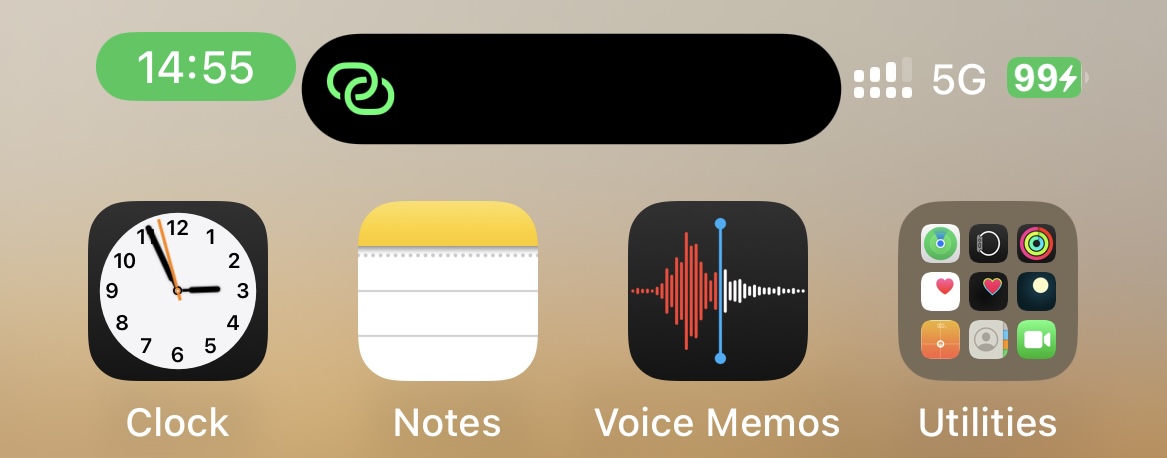
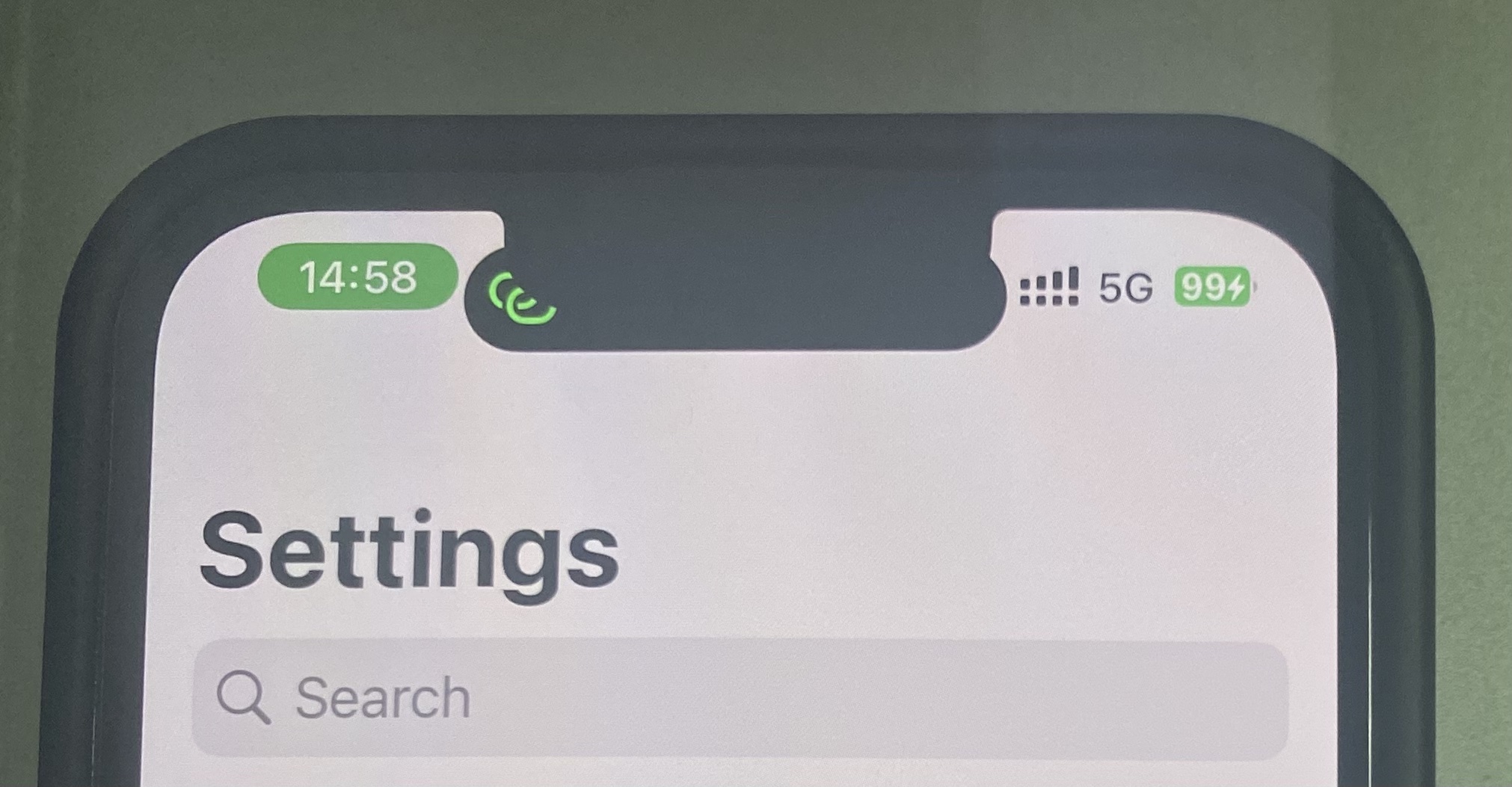
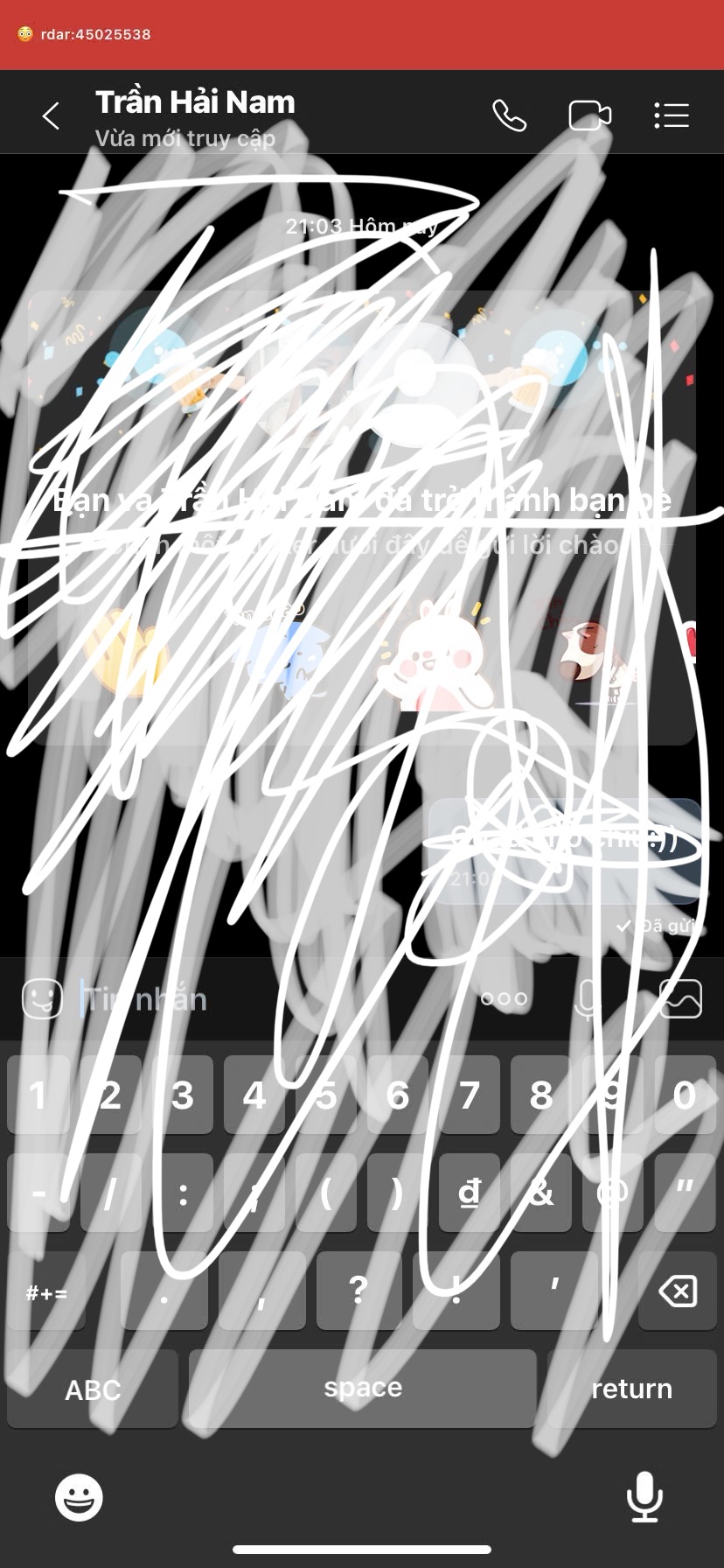
These images are user-submitted observations from the owner’s public issue tracker. They prove possible states on the named model/build—not frequency, universal compatibility or a fix.

SYMPTOM ROUTER
This browser-local form reads only your selections. It cannot inspect the iPhone, cutout, MobileGestalt, backup, USB connection or other tools.
PROOF / NOT CLASSIFIED
The result will protect access first, then separate build failure, UI exposure, geometry and residual state.
Report line will appear here. Device identifiers are never required.
Check compatibilityFUNCTION + GEOMETRY TEST
One controlled pass is enough. Do not add AOD, resolution fixes or a second preset during the same test.
Record normal Display Zoom, portrait status icons and the physical cutout before the write.
Use a system activity with a clear start/stop state; do not rely on an idle black pill.
Touch and hold, then swipe as Apple documents. Confirm the intended area responds.
Check time, cellular, Wi-Fi and battery in portrait and landscape, compact and expanded.
Verify navigation and save/close controls remain visible with normal Display Zoom.
Record whether size, spacing or shape changed; do not compensate with another write.
OBSERVED STATE LEDGER
Use the first matching row. Each state has a different proof boundary and a different reason to stop.
Restore success did not establish feature success
Check exact build, log and required reload once
The surface is exposed
Run Voice Memos, expand and collapse
Island behavior and device geometry do not match
Capture once and restore; do not tune with Display Zoom
Status bar or resolution is not at baseline
Stop preset changes and restore the newest writer
UI and layout values reverted differently
Inventory every writer; undo in reverse order
Checkbox/reset result does not match the phone
Use verified original; stop if it is unavailable
RESET / REGENERATE / ORIGINAL
This sequence avoids turning one broken display state into three overlapping ones.
Save one full top-edge screenshot, exact build, selected preset and current Display Zoom. Do not try the other size.
MisakaX, misaka26, Cowabunga Lite, Nugget, manual plist or resolution files belong on one timeline.
Use the untouched device-specific MobileGestalt saved before the first writer—not a fresh extraction of the incident.
Use that tool’s documented revert or exact original through the matched product release. Do not use another tool as a generic fixer.
Respring or reboot only as that product/release directs. An app checkbox changing is not device proof.
Island absent, red bar gone, icons and resolution normal, Display Zoom intended, apps usable and Face ID unchanged.
DYNAMIC ISLAND FAQ
Owner claims, Apple-supported behavior and individual issue outcomes remain visibly separate.
The owner lists a Dynamic Island flag for iOS 16 or later. On a matched experimental build it may expose the software island and Live Activity interface, but it cannot replace a notch, add a camera cutout or guarantee native status-bar geometry. Verify the interface, interaction and layout as separate results.
Apple currently lists iPhone 14 Pro and Pro Max, all iPhone 15 models, all iPhone 16 models except iPhone 16e, the iPhone 17 family and iPhone Air. This list is the official hardware baseline; a MisakaX result on another model remains experimental.
No. The notch, front camera, Face ID sensors and display opening remain physically unchanged. Software can draw and position an island interface, but part of it may sit behind a notch or collide with the original status bar.
The label matches the 2556-pixel display height of iPhone 14 Pro, whose native resolution is 2556 by 1179. It is a reference subtype, not a universal “small iPhone” preset. Public iPhone 13 and 13 Pro reports show that selecting 2556 can still leave wrong spacing, notch overlap or an imperfect layout.
The label matches the 2796-pixel display height of iPhone 14 Pro Max, whose native resolution is 2796 by 1290. Community guides have used it on notch devices, but reports also describe an oversized island and the red rdar bar on smaller or differently scaled displays.
They reference different native Dynamic Island display classes, not two cosmetic widths. Because iOS layout, scaling, cutout and status-bar state all matter, choosing whichever number looks closest to your screen height is not a documented compatibility rule.
Do not treat nearest-number matching as a safety guarantee. The owner does not publish a complete model-to-preset matrix, and community outcomes conflict. If no release-specific option is documented for your exact model and build, the honest state is unknown—not “try both.”
There is no owner-published perfect preset for those notch models. Issue #76 reports unchanged status-bar positioning with both 2556 and 2796 on iPhone 13, while issue #84 shows neither option looking correct on iPhone 13 Pro. Do not promote a community guess to a model rule.
No universal safe choice is documented. One community guide reported 2796 working on a 12 mini, while issue #138 describes that option as too large and 2556 still producing the red rdar bar in its tested state. Those conflicting outcomes are exactly why this page does not prescribe one number.
The owner does not publish a verified XR/11 mapping. An XR report records rdar:45025538 after selecting 2796, and iPhone 11 reports associate the red bar with missing matching resolution options. Stop if the bar appears; do not cycle presets or install an unknown resolution file.
A public misaka26 report from an iPhone SE 2022 describes the iOS 16+ method rendering a rectangle while another island option was unavailable. With no physical display cutout and no confirmed model-specific geometry, classify that as partial UI—not working native Dynamic Island.
The physical notch can cover the software’s inactive or compact presentation. Start a real Live Activity before judging function. If the active activity remains obscured, or touch targets sit under the notch, the geometry is partial and should be reverted.
The software island appeared without a matching status-bar layout. Issue #76 documents this on iPhone 13 with both 2556 and 2796. A native Dynamic Island result must also preserve readable icons, safe spacing and reachable controls.
One issue reporter said the Display Zoom/Larger Text state moved the status bar, but also made a control inaccessible in another app. That is a device-specific workaround with a system-wide layout cost, not a maintained MisakaX fix. If normal zoom overlaps, classify the island as partial.
It is a red status strip publicly reported after Dynamic Island or display-resolution changes on unsupported models. Evidence links it to incompatible resolution/status-bar state, but the owner does not publish one universal cause or repair for every device. Treat it as a failed display state.
No. Apple separately documents normal indicators for an active call, FaceTime, Personal Hotspot, screen recording, camera and microphone use. End the related activity first. Classify this page’s failure only when the abnormal strip literally shows rdar:45025538 or the top-edge layout remains wrong after normal activity ends.
The text appears in iOS status-bar behavior and long predates MisakaX, but Apple does not publish a consumer support article that maps this number to a user repair. This page therefore uses the exact observed label without inventing an official expansion or meaning.
Do not assume that. It proves the display/status-bar state is not normal, and some reports combine it with broken resolution or difficult rollback. Capture the screen once, stop new display writes and return to the known original state.
Do not try another preset first. Record every tool that changed Dynamic Island, resolution, Display Zoom or status bar, identify the newest writer, and use that tool’s matched revert or the verified pre-change MobileGestalt through the matching product route. Then reboot or respring only as documented and verify resolution, zoom and spacing.
No. Public issue comments circulate unsigned resolution files and cross-tool recipes, but they are not owner-maintained universal fixes and may target another panel class. We do not redistribute them. Restore known device-specific state instead of adding an unknown display payload.
Some users report applying a Cowabunga Lite operation, but outcomes and device mappings conflict. A second writer also creates a second rollback boundary. Do not use Cowabunga Lite as an automatic MisakaX repair; if it already changed the device, record it and undo changes in reverse order with each tool’s own backup.
There is no owner-published universal sequence. Community comments give device-specific ordering advice tied to third-party files. Adding another display-resolution operation before or after the island increases attribution and rollback uncertainty, so this guide does not recommend either sequence.
The island surface and status-bar or resolution state can persist separately. This is especially plausible when MisakaX, Cowabunga Lite, Nugget or a manual file touched overlapping configuration. Do not re-enable the island to hide the gap; inventory writers and restore the original baseline.
Yes when both change overlapping MobileGestalt, display-resolution or status-bar state. A reset in one tool cannot prove that another tool’s write was removed. Keep separate before/after records and revert newest changes first with the tool and backup that created them.
An unchecked box is only an intended input. Public MisakaX and misaka26 issues record island state persisting after uncheck or reset attempts. Use the matched reset/original-file workflow, reload as required and verify the actual interface—not the desktop checkbox.
Names vary by product release. A reset or regenerate action may construct a baseline or reapply a file, while a verified original is the untouched device-specific file saved before any modification. Do not assume these buttons are interchangeable; follow the exact release path and verify the result on the phone.
No. A fresh extraction can describe the current modified state. Preserve it as incident evidence, but do not label it pre-change. Use the untouched file saved before the first writer; if it is missing, stop guessing and seek project support.
Do not download another device’s plist or manually guess subtype and resolution values. Save the current file, exact device/build, product release, screenshots and log, then stop further writes. Another person’s MobileGestalt is not a valid recovery file for your phone.
Issue #168 records that exact observation on an iPhone XS, but it remains an unresolved single-device report. It does not establish a normal conversion rule. Record before/after screenshots and product state, then restore rather than chasing the changed label with repeated writes.
Success may describe the restore or reboot stage. Confirm the exact supported product/build, selected flag and required reload, then test a real activity. Public issues show Apply completing with no feature on builds outside the claimed range. Save the log and do not spam Apply.
No. Repeated attempts are inconsistent community advice, not a maintainer-confirmed repair. They make it harder to identify which preset or file is active and whether rollback worked. Preserve one attributable attempt and diagnose its first failed stage.
Not by itself. The useful test is an active alert or Live Activity. On Apple’s supported path, the physical island remains while the software presentation changes; on a notch device the inactive software surface may be hidden by the notch. Test Voice Memos or Maps before classifying it.
Start a Voice Memo or Maps navigation, confirm the activity appears, touch and hold to expand it, swipe to collapse it and check portrait and landscape. Then inspect clock, signal, battery, touch targets and another app. Repeat once after the required normal reload.
Apple says supported models can switch between two activities by swiping from one side or the other. On an experimental device, treat this as an optional advanced test after one activity already passes; lack of a second available activity is not by itself a failure.
They must at least remain readable and non-overlapping. Exact icon movement depends on the activity and supported layout. An unsupported phone retaining its old status-bar positions under the expanded island is partial evidence, as shown in issue #76.
Yes. Orientation can expose clipping, touch-target and safe-area faults that are hidden in portrait. Test one activity in both orientations and return to normal portrait before judging whether the rest of the interface recovered.
That is a touch-geometry failure even if the animation looks correct. Stop using the layout, capture the mismatch and restore the baseline. A visual island with unreachable or displaced controls is not a passing result.
A mismatched status bar, display zoom or safe-area state can obscure app controls. Issue #76 records a Display Zoom workaround that made a control inaccessible in another app. Test at least one full-screen app and revert if controls move off-screen.
The island flag cannot add or replace Face ID hardware. A layout-only result should not change Face ID; if biometrics, device identity or activation changes, treat that as a core-service incident and revert immediately rather than diagnosing island size.
The available issue evidence does not establish that MisakaX Dynamic Island causes burn-in. OLED persistence risk depends on prolonged static high-contrast content and brightness. Do not leave a broken static bar or island on screen; restore abnormal display states instead of making a causal claim.
Do not update as an experimental repair. An update changes the build and can leave the product’s supported range while preserving or changing the display state unpredictably. Revert first while the device is reachable, verify the normal layout, then update for ordinary reasons.
Capture the idle status bar, one expanded Live Activity, portrait and landscape, and the red bar or overlap if present. Include the whole top edge so cutout and icons are visible. Do not post lock-screen notifications, contact names, account details or device identifiers.
Include model, ProductVersion, BuildVersion, MisakaX or misaka26 release/platform, preset label, cutout type, every other tool that wrote display state, reload used, observed activity, screenshots and reset result. Redact serial, UDID, IMEI, account data and MobileGestalt contents.
There is no zero-risk claim. The owner warns that MobileGestalt changes can bootloop a device, while public reports show red bars, wrong resolution, overlap, no effect and difficult reverts. Use a current backup and verified pre-change MobileGestalt, or do not test if restoring the device is unacceptable.
SOURCE BOUNDARY
No issue comment becomes a universal model map. Images retain their exact model/build context, and third-party fix files are intentionally excluded.